

Lit Support Tip – CDs and DVDs
 You've heard of that saying that “you don't know what you don't know”? This might be one of those scenarios.
In Litigation Support, we have a tradition. When new electronic data arrives on our desk, our first thought is “how much data is it?” We all have our own mental gauge of what we consider to be a small amount or a decent amount. One of my gauges relates to whether the data is on a CD or a DVD. In my mind, any data on a CD, no matter how much, is considered very small. When I realize the data is on a CD, I think to myself, “this is nothing!”
On the flip side, data on a DVD can cause a little more anxiety about the length of time I will be dealing with the data. There are many instances where a DVD will contain very little data, but there are other times where that DVD is jammed full of data. My personal favorite (but not really) is when someone decides to send us data on a dual-layer DVD where the capacity is doubled. Yay!
When the disk arrives, it usually has a label applied to the front side which describes the contents. We are finally beyond the days of someone handwriting a description onto the face of the disk with a permanent marker. If you're still doing that, please stop. That is so 1990's.
If my first thought is “how much data is it?”, I could insert the disk into my computer and have it tell me how much data there is, but I am more eager and I just need a general idea. Is it “nothing”? Or is it going to take longer to deal with? If the disk has a label applied, I am unable to read the face of the disk where it states whether it is a CD or a DVD.
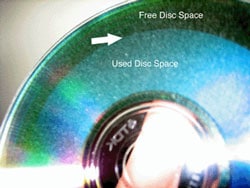
I am always surprised to learn that some people don't know this little trick. First, when you look at the back side of the disk, you can tell right away if it is a CD or a DVD. A DVD has a bluish or purplish tint to it similar to the photo above. Although CDs can play off of the light, they are basically silver in color. Second, for both a CD and a DVD, you can tell from the back side how full the disk is. There is a distinct circular line, sort of like rings in a tree, that shows whether the disk has very little data on it or whether it is almost full.
I am curious how many people know about this trick. Please vote in the poll below.
 Loading ...
Amy, Great to see you on Tuesday. Another great little tip. So many things, both big and small, that go into becoming a solid lit support manager. Cheers, Scott